
What is AudioProcessingObject Driver Update?
If you recently saw a Microsoft Corporation AudioProcessingObject Driver Update while updating Windows but have no idea what it does or why it s…
Download Windows Speedup Tool to fix errors and make PC run faster
If you recently saw a Microsoft Corporation AudioProcessingObject Driver Update while updating Windows but have no idea what it does or why it suddenly appeared, this article will help. Here is everything you need to know about AudioProcessingObject Driver Update, whether you should install it or not, what happens if you do/don’t install this driver, and so on.
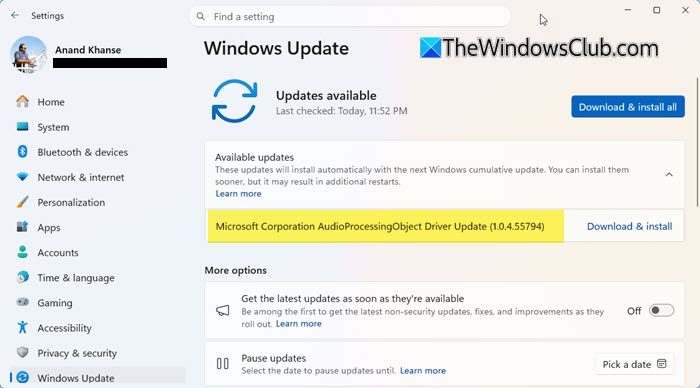
AudioProcessingObject or APO, is a Windows driver required to add sound effects such as an equalizer, noise reduction, microphone enhancements and additional sound effects to your existing audio.
If you don’t have third-party audio hardware, you might not see it when updating the driver. However, some speaker manufacturers use this driver to provide better audio quality and some enhancements. If you recently installed high-end audio equipment from Dolby, Realtek, etc., you may see this driver update in the Windows Settings panel.
Primary functions of AudioProcessingObject
To understand the objectives of Audio Processing Object, you need to review the features of your recently installed audio hardware.
Certain features such as Audio Enhancements, Equalizer, noise reduction, etc., require you to have Audio Processing Object or APO installed.
It helps in the following areas:
- It adds or updates software-level digital signal processing for Windows audio streams.
- It helps clean up live chat audio, improve microphone clarity, and support audio effects.
- It works behind the scenes, so conferencing apps, games, or audio enhancements can use processing features rather than relying on a replacement sound card driver.
What happens if you do not install the APO driver update?
We install drivers to improve the connection between your hardware and software, and between your desired requirements and the actual output. If you have already installed the audio driver earlier, there is no harm in installing the update. Manufacturers do not often roll out updates for APO; they usually do so only when necessary.
It’s not just Microsoft, audio hardware and software vendors frequently ship their own APOs too. As a result, you may see updates from Dolby, DTS, or A-Volute (Nahimic) labeled with “AudioProcessingObject” in the update name.
However, if you do not install the driver, you will miss out on essential features your hardware could support but cannot without the driver.
Is AudioProcessingObject safe?
AudioProcessingObject is safe to install. However, if you have any doubts, we recommend verifying the digital signature.
How to check if you have the AudioProcessingObject driver installed or not?
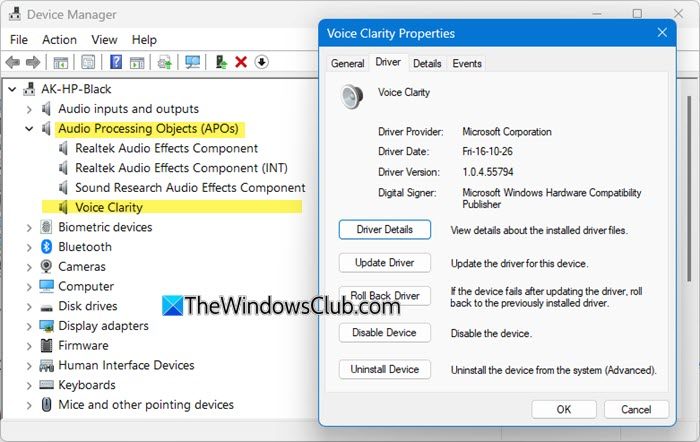
To check whether you have the AudioProcessingObject driver installed or not, press Win+X and select Device Manager.
Expand the Audio Processing Objects section and check whether you have any such driver or not. If a driver is available, you can also see the manufacturer.
If you have installed Microsoft Corporation AudioProcessingObject Driver you will see it as Voice Clarity.
Hope this article has cleared all your doubts.
Read: DTS Audio Processing settings are unavailable or not working.

Anand Khanse is the Admin of TheWindowsClub.com, a 10-year Microsoft MVP (2006-16) & a Windows Insider MVP (2016-2022). Please read the entire post & the comments first, create a System Restore Point before making any changes to your system & be careful about any 3rd-party offers while installing freeware.
内容来自 The Windows Club,版权归原作者所有。
阅读原文 ↗


