
Best AI Tools for Scheduling and Planning
Managing a busy schedule can be a headache, especially when multiple meetings need to be scheduled on the same day or within the same week. It can be time-consuming, so to help our fellow users, we’ve found some AI tools for scheduling and planning to take some of that work off their hands.
If you are looking for AI tools for scheduling and planning, check these out.
- Morgen
- Motion
- Calendly
- Reclaim. ai
- Meta Muse
Let’s take a closer look at each one.
1] Morgen
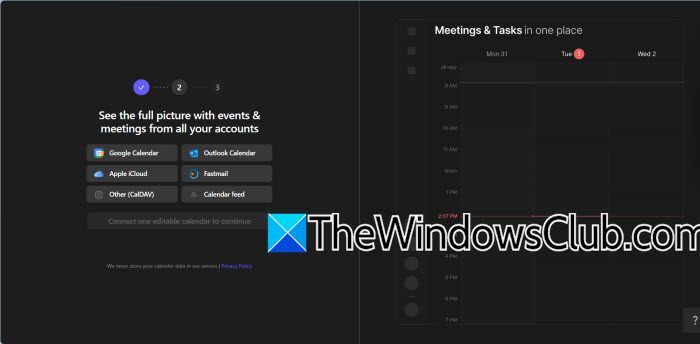
Workload and meetings are scattered all over the place, and scheduling a meeting takes more time than the actual work? Morgen.so is a relief from this hustle, as it brings together all the calendars and task management into a single interface. Users can connect it with Google Calendar, Outlook, Fastmail, or iCloud, and even connect task management services such as Notion, Todoist, ClickUp, and Linear.
Once connected, users can create Frames, a category of work assigned to a specific time period. For example, if you assign a time period for time-consuming tasks, the AI sorts all matching tasks into those frames. However, users can still add meetings over them. Each frame has a busy/free toggle, so if a date is marked as busy, the AI automatically marks availability to avoid double bookings or meeting mishaps.
Morgan offers a 14-day free trial but no free plan. Individual plans range from $30 per month to $15 per month annually. The Team plan starts at $25 per month, or $10 per month on the yearly subscription, and includes unlimited calendars and task integrations, a booking page and scheduling links, and calendar automation. The company also has another product named Kai, an AI executive assistant that can record calls and turn them into summaries. In addition, it sorts emails and drafts replies, and so on. However, it is a separate product with its own subscription rather than an added feature in Morgen, so make sure to check it out.
2] Motion
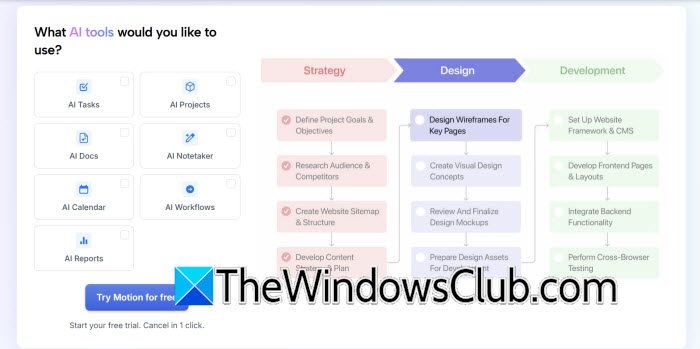
If your schedule changes in the blink of an eye and it’s hard to keep track of everything manually, UseMotion.com is the right place to invest. It combines task management, project planning, and schedule management in one place. Once it is connected to your calendar, it adds all tasks with their deadlines, priorities, and estimated completion timelines. It then places these tasks into available calendar slots and moves them based on urgency.
Motion also helps teams manage projects, assign tasks, and monitor workloads. Its AI meeting assistant and notetaker simplify meeting scheduling, booking links, and capturing meeting notes and summaries. Like Morgen, Motion offers a free trial rather than a free plan. Its Pro AI plan starts at $19 per seat per month with annual billing. The Business AI plan starts at $29 per seat per month with additional features such as capacity planning, advanced reporting, and time tracking. Its best feature is availability on both desktop and mobile devices.
3] Calendly
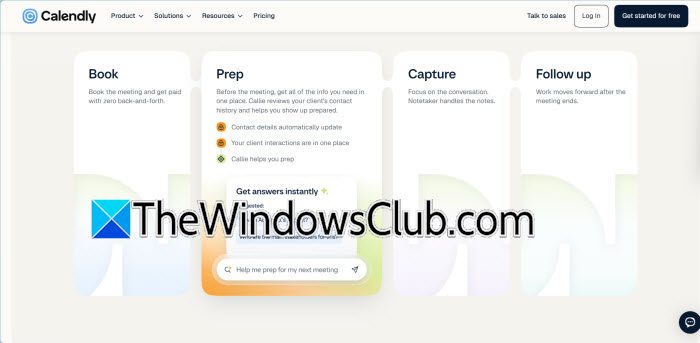
Calendly.com is different from other AI tools. It doesn’t automatically schedule tasks; instead, it lets clients, candidates, or customers book time with you, eliminating the need to exchange multiple emails to arrange a meeting. Users can connect their calendar, specify their available hours, and create a booking link. The link is shared with anyone who wants to book a meeting; they pick a slot, and Calendly creates the appointment and handles buffers and time zones.
Calendly’s newer AI feature, Callie, is an AI assistant in beta that works inside email threads and helps schedule meetings. We can add [email protected] to the email thread and ask it to find a suitable time slot based on the client’s availability. The client can select a time by replying to the email or using the booking link. Callie then coordinates the booking and updates the calendar after getting permission.
Calendly has a free plan that supports one calendar connection and one event type. Its standard plan starts at $10 per seat per month with annual billing, and the Team plan starts at $16 per seat per month. The latter plan adds round-robin scheduling and lead routing to manage appointments across multiple employees.
4] Reclaim.ai
Reclaim.ai works alongside Google Calendar and Outlook to protect time for work that often gets pushed aside. We can set a weekly Focus Time goal, and Reclaim will automatically fill available calendar slots with work sessions. If a focus block conflicts with another event, it moves the block to another suitable time instead of canceling it.
Its AI Habits feature schedules recurring activities such as lunch breaks, exercise, and deep work. Reclaim’s standout feature is its AI Tasks that bring assignments from tools such as Asana, Todoist, ClickUp, Jira, and Linear into the calendar and then find the time to complete them. Smart Meetings further help users coordinate recurring meetings across participants, while Buffer Time reserves breaks or preparation time around meetings.
Reclaim offers a free Lite plan which includes basic scheduling features, although it is limited to scheduling one week ahead and provides limited calendar sync and integrations. The Starter plan starts at $12 per user per month (billed annually), while Business costs $15 per user per month (billed annually).
5] Meta Muse

Meta Muse, although it is not a dedicated planning or scheduling AI tool, can be considered one due to what it offers to its users. It is a broader personal AI agent that helps organize goals, coordinate activities, and complete tasks on the user’s behalf. Users can connect it to Gmail, Google Calendar, Outlook, and other apps, and then ask Muse to do their jobs. Users can ask it to sort out this week’s calendar conflicts, book dinner and add it to the calendar, or find a time for the client call and send the invitation.
It manages reservations, sets reminders, and follows up with people. The best part is that it does it all in the background, and only sends a notification when something needs the user’s attention. Muse handles email sorting, drafts replies and coordinates scheduling for travel time. Its standout feature is the ability to generate new tools from users’ descriptions. For example, users can simply ask Muse to create a shared family manager. It would produce a working web app inside the Meta ecosystem that users can easily access.
However, it still needs review before it is confirmed or sent. It offers a free tier with a usage limit, as well as paid subscriptions such as Power and Maximum at $20 and $100 per month, respectively. It is also US- and Canada-first and in limited testing, so availability may vary depending on where users are.
That’s it!
What is the best AI tool for planning?
Motion is one of the best AI planning tools for people who want to automate their daily schedules, tasks, and projects. It prioritizes deadlines, schedules work around meetings, and automatically reorganizes the calendar when plans change. However, Reclaim. ai is a better starting point if one wants to protect focus time and maintain routines without paying for a subscription.
Read: Best AI Tools for Social Media Management
Which AI is best for planning a study schedule?
The best choice depends on the user’s needs. If they want auto-scheduling study blocks in their calendar, Reclaim.ai is the best option; if they want to create custom weekly plans without extra apps and fees, ChatGPT is the best option. However, if they want an all-in-one system, checking out Notion AI is the best move.
Also Read: Best AI CRM tools.
内容来自 The Windows Club,版权归原作者所有。
阅读原文 ↗