
How to use Meta Muse, the Proactive AI Agent that works when you don’t
Download Windows Speedup Tool to fix errors and make PC run faster
Meta Muse AI not only gives you information but also works as a personal agent that actually executes tasks on your behalf. From a personal research agent to a task executor, Meta Muse does it all. In simple terms, it combines AI with a human-like task scheduler, which is both scary and exciting. Here, you’ll learn almost everything about Meta Muse, which keeps working even when you are on vacation.
What is Meta Muse?
Meta Muse is an AI agent that is much more advanced than ChatGPT, Gemini, Perplexity, or Copilot since it can actually perform tasks on your behalf. From booking a restaurant reservation to saving you money, Meta Muse has become highly capable in a short time. Meta Platforms, the owner of Facebook, WhatsApp, Instagram, etc. owns it.
What can you do with Meta Muse?
If you can think of a task, it can perform it for you. However, here is a brief list of some of the most interesting tasks that you can do using Meta Muse:
- Check your email and create a list of specific things at a specific time interval. For example, if you want to create a list of coupon codes you received over the week and go shopping on weekends, it can consolidate them for you by scanning your emails.
- Let’s say that you have medical insurance that you need to pay every year. It could be expensive at times. So Meta Muse can find identical insurance with very similar benefits at a lower rate.
- If you want to create a To-Do list in the morning based on what you did yesterday or over the weekdays, it can do that for you.
- Let’s say there is a new restaurant in town and you want to try it even though it is a busy time. Instead of checking on the available dates frequently, you can ask Meta Muse to book a spot for you.
- Send replies: Whether you want to reply to someone on Messenger, WhatsApp, Instagram, or email, Meta Muse can read the message, think of a reply that matches your perspective, and send it accordingly.
- It can shop for you. If you often forget to buy a present for a dear one, it can remind you of the special day, browse the internet for a suitable present based on your requirements, and buy it for you. But it requires your permission to make the purchase via your card.
- Newsfeed personalization is also possible. Whether you want to personalize your newsfeed in a social media app or get a personalized feed in Meta Muse, you can do both.
There are countless other things you can do with Meta Muse.
How to set up and use Meta Muse AI
Setting up and getting started with Meta Muse is fairly easy and not very time-consuming since it uses your Facebook information and account data to get the job done. You can visit ai.meta.com/muse and click on the Try Muse button to create an account for this AI agent.
However, you can also download the Meta Muse app on Android, iOS, and Mac. Right now, Meta Muse is free but has some limitations because it is still in its early phase and isn’t available in all regions.
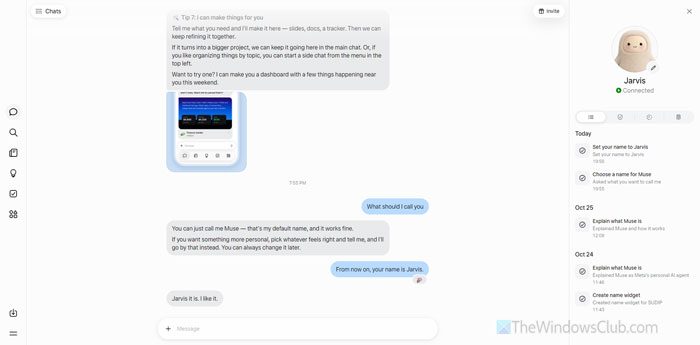
First, name your agent. You can ask for a suggestion based on your favorite shows, characters, etc. This way, you can test it from the beginning.
Following that, the most important thing is the Connectors section. Here you can find some of the most common apps such as Gmail, Instagram, WhatsApp, Google Calendar, Google Drive, Slack, Google Contacts, Facebook, Messenger, GitHub, etc.
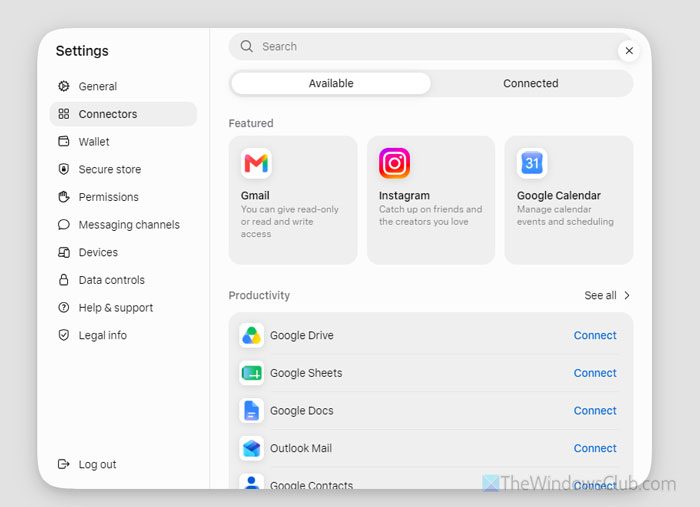
You must connect those apps with Meta Muse so that your personal agent can perform tasks fluently. For example, if you want to ask your agent to save a contact based on the newest email, you must connect Google Contacts and Gmail. On the other hand, if you ask it to go through your recent WhatsApp group messages, you must connect WhatsApp first.
Personalization:
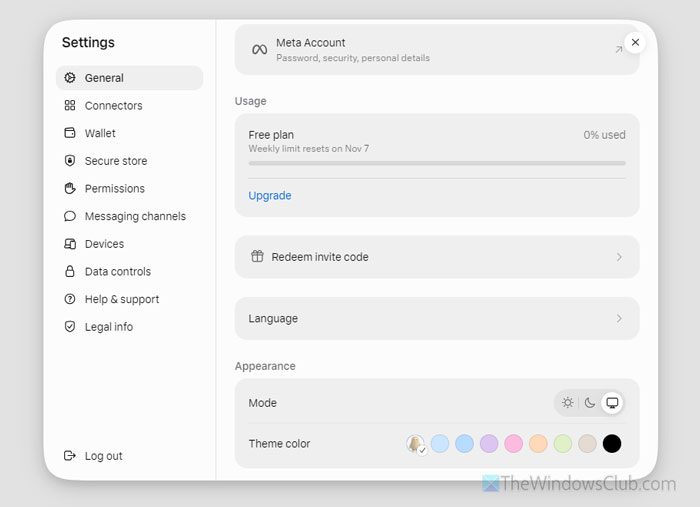
Right now, there aren’t many options. However, you can go to the General section to change the language, theme, and mode (Light/Dark).
Permissions:
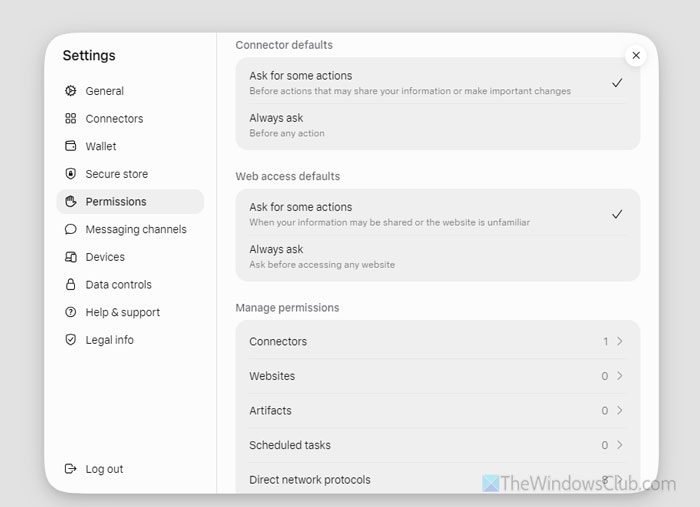
It includes a built-in browser for browsing the internet. You can choose to ask for permission before every task or let it run on its own.
You can also find all the connectors, websites, artifacts, scheduled tasks, etc.
Read: How Meta Muse can transform your Daily Workflow
How is Meta Muse different from other AI agents?
There are a lot of things that differentiate Meta Muse from others, and that is both scary and exciting. Here’s why:
- First, it can choose a product on the internet that matches your interests. How does it do that? It requires a huge amount of information about your daily life, your shopping patterns, your credit card information, and how you have talked to someone on WhatsApp, Messenger, Gmail, etc. Without these details, it won’t know the most suitable item.
- It can call someone on your behalf, which is great, and almost no AI can do that. It can call a restaurant and book a reservation, call for a doctor’s appointment – even call your bank for any kind of confirmation. It is fine as long as you can hear the conversation. However, that is not possible yet. All you can do is that you can read the transcript.
- It has its own browser. It doesn’t need a third-party browser to browse the internet.
- It doesn’t require an internet connection to perform certain tasks.
- It uses a secure virtual computer to store your data, whereas other AI agents store data more publicly.
Read: Is Meta Muse Safe? How AI Sentinel protects your Personal Data
Final Words
Meta Muse differs from other AI agents in many ways. It actually does the work in a smarter way than other agents. However, it is still in its early days, and a lot needs to be done and improved. Meta Muse also needs more connectors and apps so more people can benefit.
These posts may interest you:

When he is not writing about Microsoft Windows or Office, Sudip likes to work with Photoshop. He has managed the front end and back end of many websites over the years. He is currently pursuing his Bachelor's degree.
内容来自 The Windows Club,版权归原作者所有。
阅读原文 ↗